How you sign up for Pig Out texts
Pig Out LLC, Clovis, California. You can read this page without logging in and without an order or a cart.
This page shows every way a person can agree to receive text messages from Pig Out, with the exact words they see and a picture of each screen. The program is called Pig Out text messages. It is run by PIG OUT LLC (Pig Out, a restaurant in Clovis, California). Texts come from (559) 314-7522.
Nothing is pre-ticked. Consent is not a condition of purchase. Message frequency varies. Message and data rates may apply. Reply STOP to cancel, HELP for help.
What we text
- Deals, specials and photos of specials (marketing), only to people who agreed in one of the ways below.
- Updates about one order (confirmed, ready for pickup, out for delivery), up to 3 per order, only to people who ticked the separate order-updates box.
- A one-time sign-in code for the Piggy Bank, only when a person asks for it with their own number.
- A confirmation of each sign-up, and replies to people who text us first. Marketing texts go only from 8am to 9pm Pacific.
1. The deals box at checkout
Where: pigout-fresno.com, add an item, open the order, and the box is above the Pay button. It starts empty and is never required to order.
The words next to the box
Send me deals from Pig Out, including late night deals. Marketing texts and emails. Message frequency varies. Consent is not a condition of any purchase. Message and data rates may apply. Reply STOP to cancel, HELP for help.
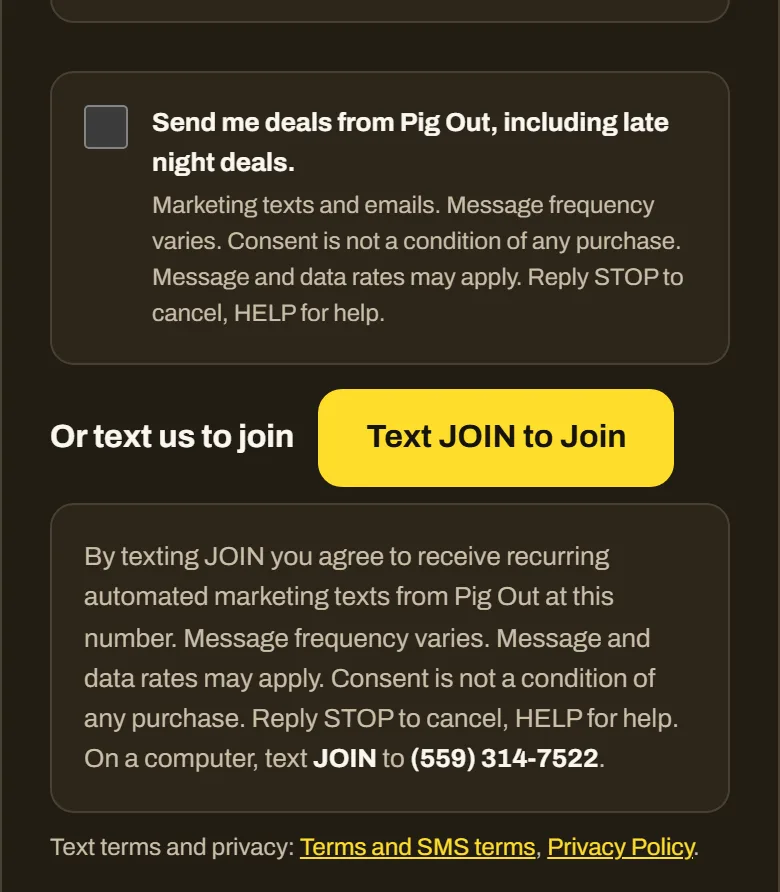 The checkout, deals box unticked. The number shown anywhere on these pictures is made up.
2. The order-updates box at checkout
Where: the same checkout. A second, separate box appears under the deals box as soon as a phone number is typed. It starts empty, is not required to order, and is not agreeing to marketing.
The words next to the box
Text me updates about this order, like when it is ready for pickup or out for delivery. Up to 3 messages per order. Message and data rates may apply. Reply STOP to cancel, HELP for help. Not required to order.
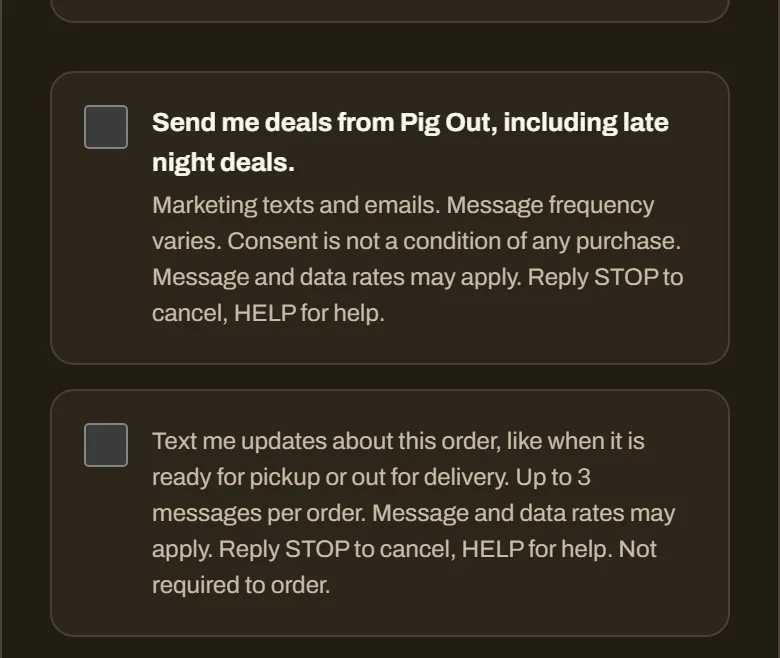 The checkout with a phone number typed: two separate boxes, both unticked.
3. The deals sign-up page
Where: pigout-fresno.com/join, a public page. A phone number field and an empty box. Signing up there only sends a request: the number counts as agreed after the person replies YES to our confirmation text.
The words next to the box
Yes, text me deals from Pig Out, including late night deals and photos of specials, at this number. By checking this box you agree to receive recurring automated marketing texts from Pig Out. Message frequency varies. Consent is not a condition of any purchase. Message and data rates may apply. Reply STOP to cancel, HELP for help.
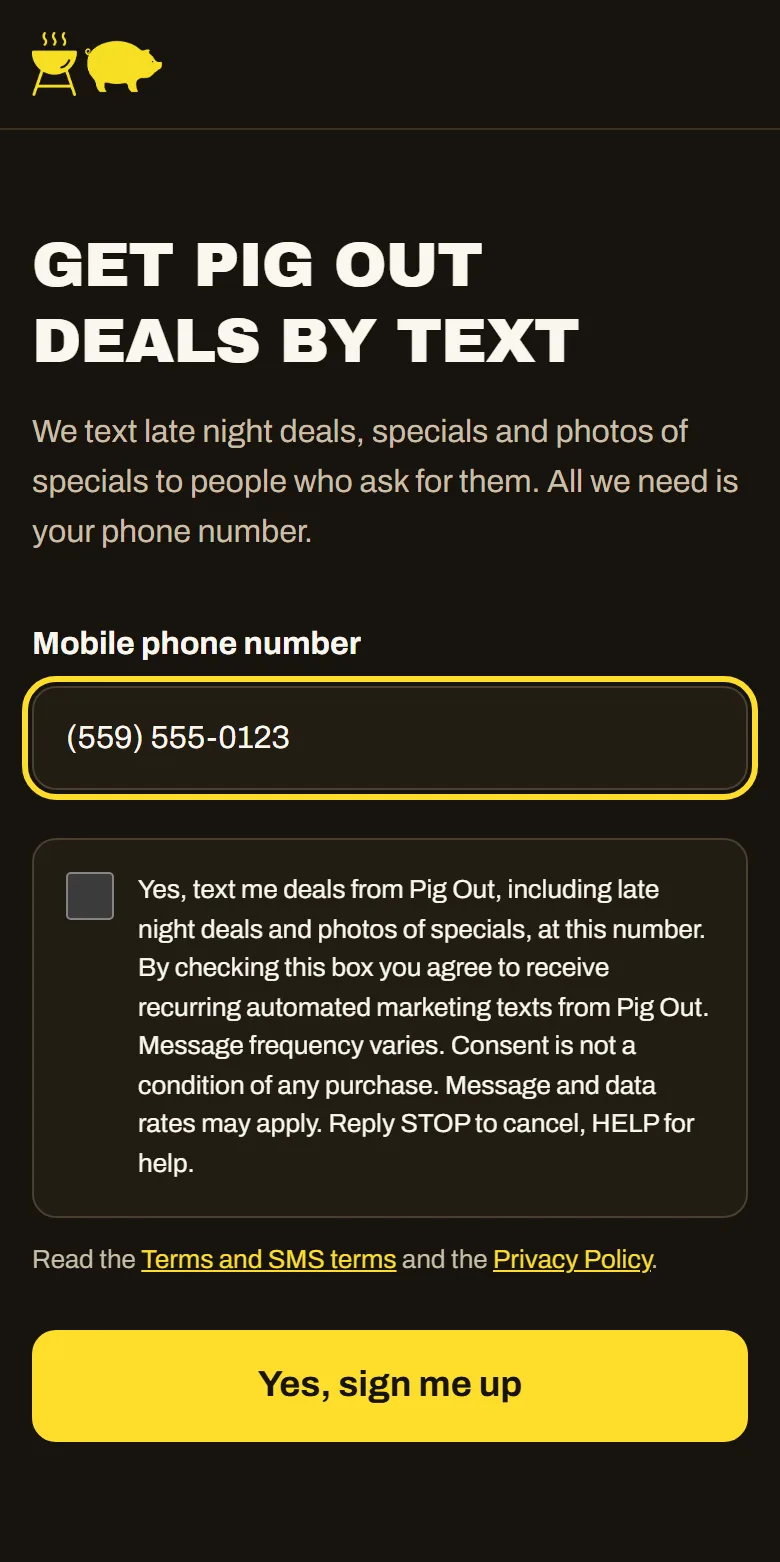 The /join page: the box is unticked until the person ticks it.
4. Text to Join
Where: a person texts the word JOIN (or JOIN DEALS or SUBSCRIBE) to (559) 314-7522. It can be done by tapping the yellow Text JOIN to Join button on /join or at checkout, which opens the messaging app with the number and the word already typed, or by typing it by hand, or by scanning this code with a phone camera. The person sends the text themselves, so the text is the agreement.
The words shown beside every Text to Join button
By texting JOIN you agree to receive recurring automated marketing texts from Pig Out at this number. Message frequency varies. Message and data rates may apply. Consent is not a condition of any purchase. Reply STOP to cancel, HELP for help.
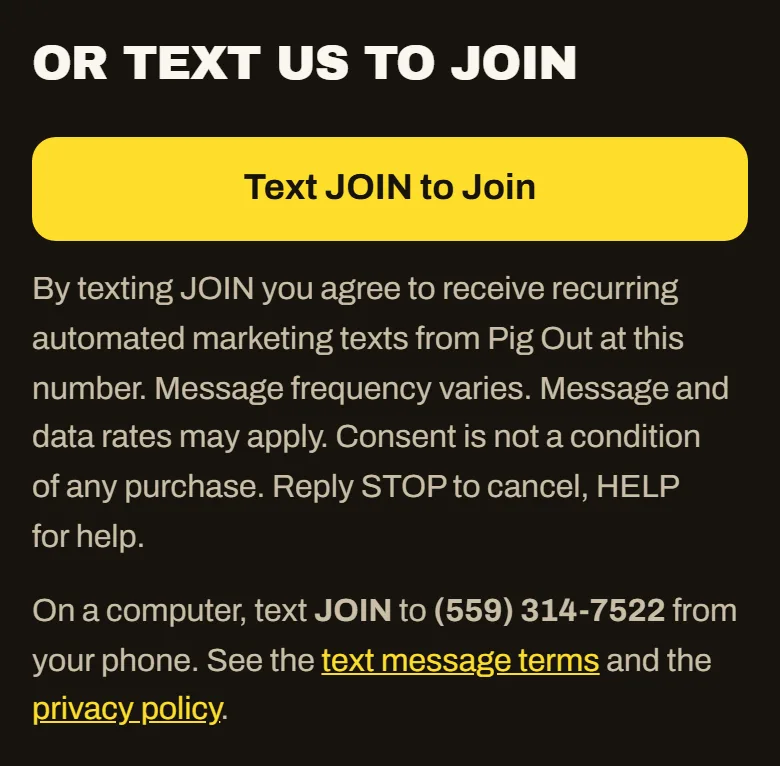 The Text to Join button and the number and word written out for computers.
Scanning the code opens a text to (559) 314-7522 with the word JOIN ready to send. It is the same link as the button.
5. Piggy Bank sign-in code
Where: the Piggy Bank (Pig Out Perks) sign-in on pigout-fresno.com, when a person chooses Phone, types their own number and presses Text me a code. There is no box: the line directly above the button is the agreement, and it covers that one sign-in text only, not marketing.
The line above the button
By asking for a code you agree to get one text from Pig Out with your sign-in code. Message and data rates may apply. Reply STOP to stop, HELP for help.
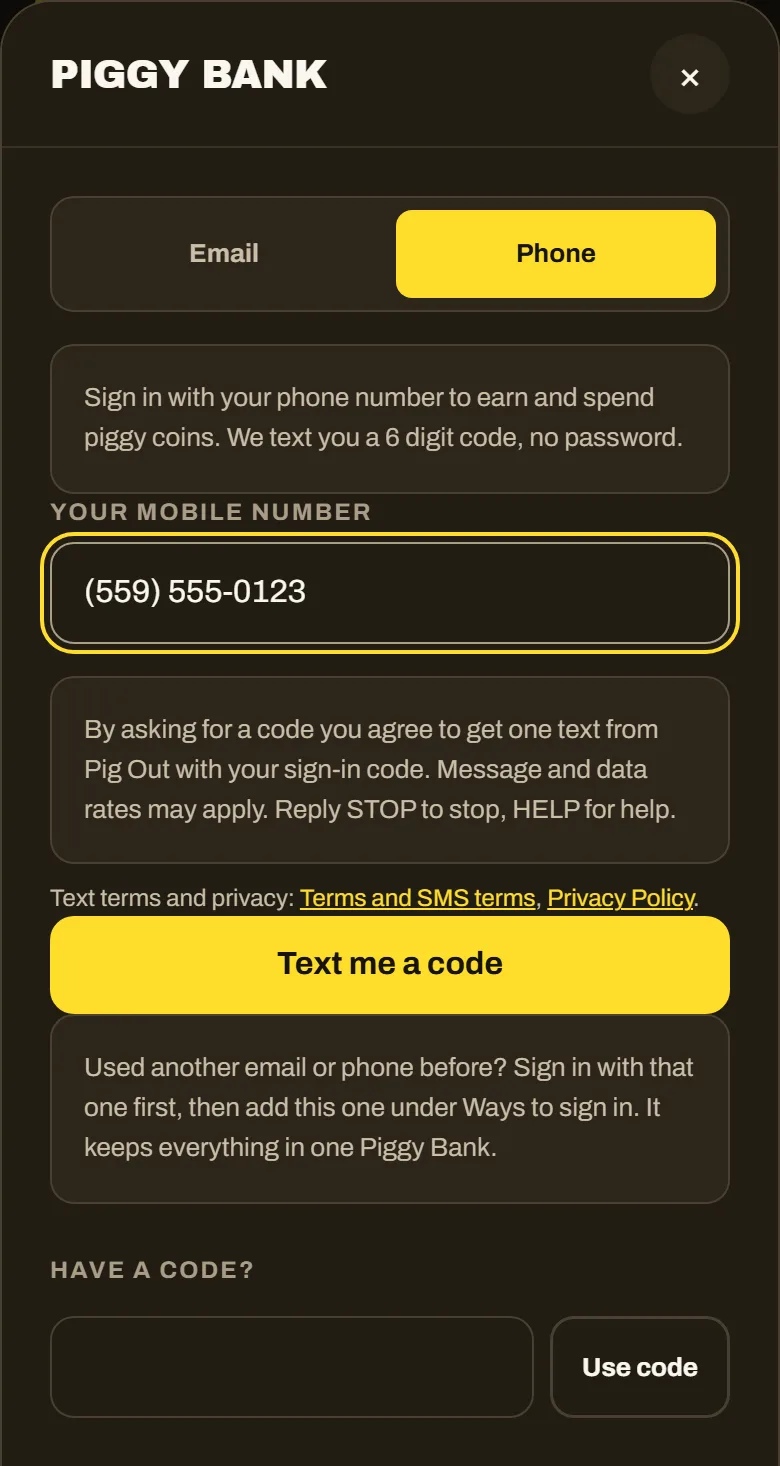 The Piggy Bank sign-in. Signing in by email is always offered as well.
6. The texts we send back
Every sign-up is answered, and every text says how to stop and how to get help. These are the exact texts.
Confirmation after a checkout deals box or a Text to Join sign-up
Pig Out: you are signed up for deals by text. Message frequency varies. Message and data rates may apply. Reply HELP for help, STOP to stop. Terms: pigout-fresno.com/sms
Confirmation request after the /join page (the person replies YES)
Pig Out: reply YES to confirm you want deals texts from Pig Out. Message frequency varies. Message and data rates may apply. Reply HELP for help, STOP to stop. Terms: pigout-fresno.com/sms
Reply to HELP
Pig Out, Clovis CA. For help call (559) 470-8885 or email [email protected]. Message frequency varies. Message and data rates may apply. Reply JOIN for deals, STOP to stop.
Reply to STOP
Pig Out: you are unsubscribed from Pig Out texts. No more messages will be sent. Reply HELP for help or call (559) 470-8885. Reply START to sign up again.
Reply to START (signing up again after a STOP)
Pig Out: you are signed up again. Message frequency varies. Message and data rates may apply. Reply HELP for help, STOP to stop. Terms: pigout-fresno.com/sms
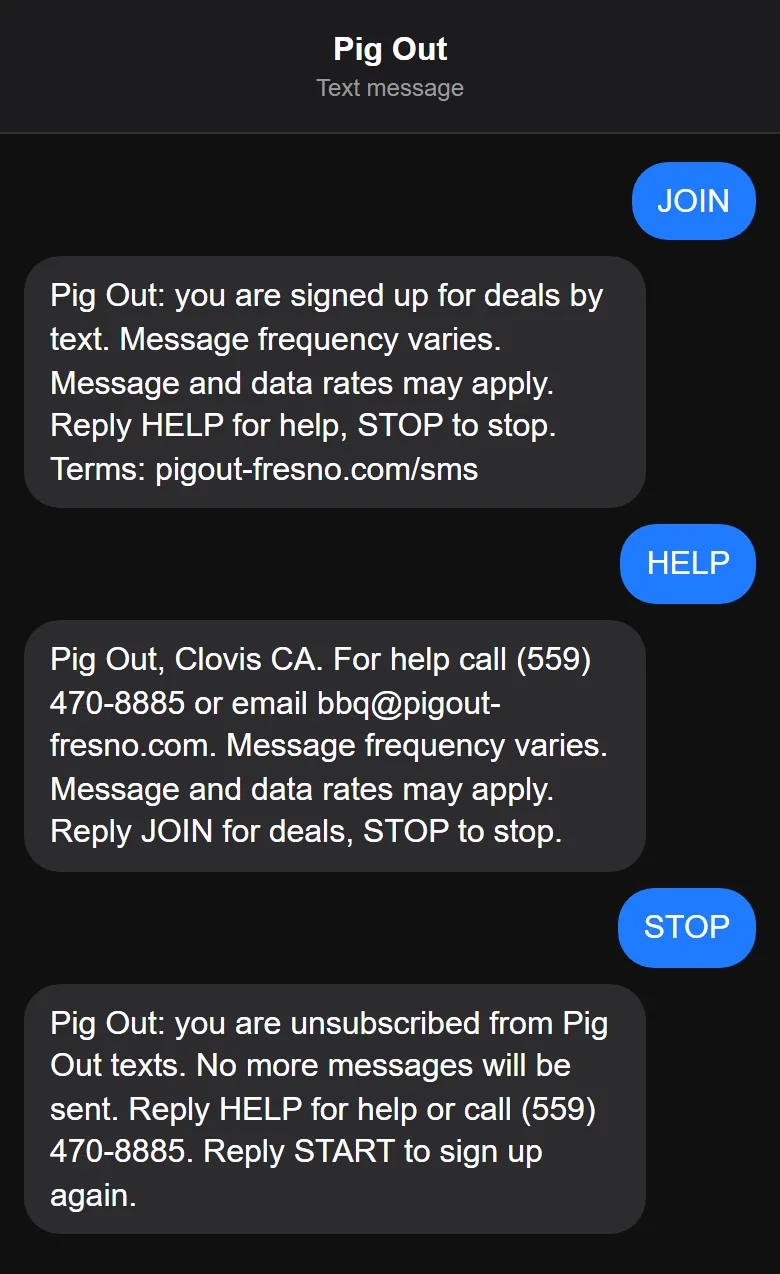 How the texts read in a conversation, using the exact words above.
7. Website chat: text me the answer
Where: the Chat with Piggy button on pigout-fresno.com. A visitor first verifies their own mobile number with a one-time code (the sign-in code in section 5). Then Ask a Person shows an empty box. Ticking it lets a person at Pig Out text one-to-one replies about that question, for 72 hours. It is optional, it is not needed to use the chat or to buy, and it is not a marketing sign-up: nothing is added to the deals list. This box is part of this registration and is switched on when the campaign is approved; the picture shows it as it will appear.
The words next to the box
Text me the answer. A person at Pig Out can text me back at this number about this question. Message and data rates may apply. Reply STOP to stop, HELP for help.
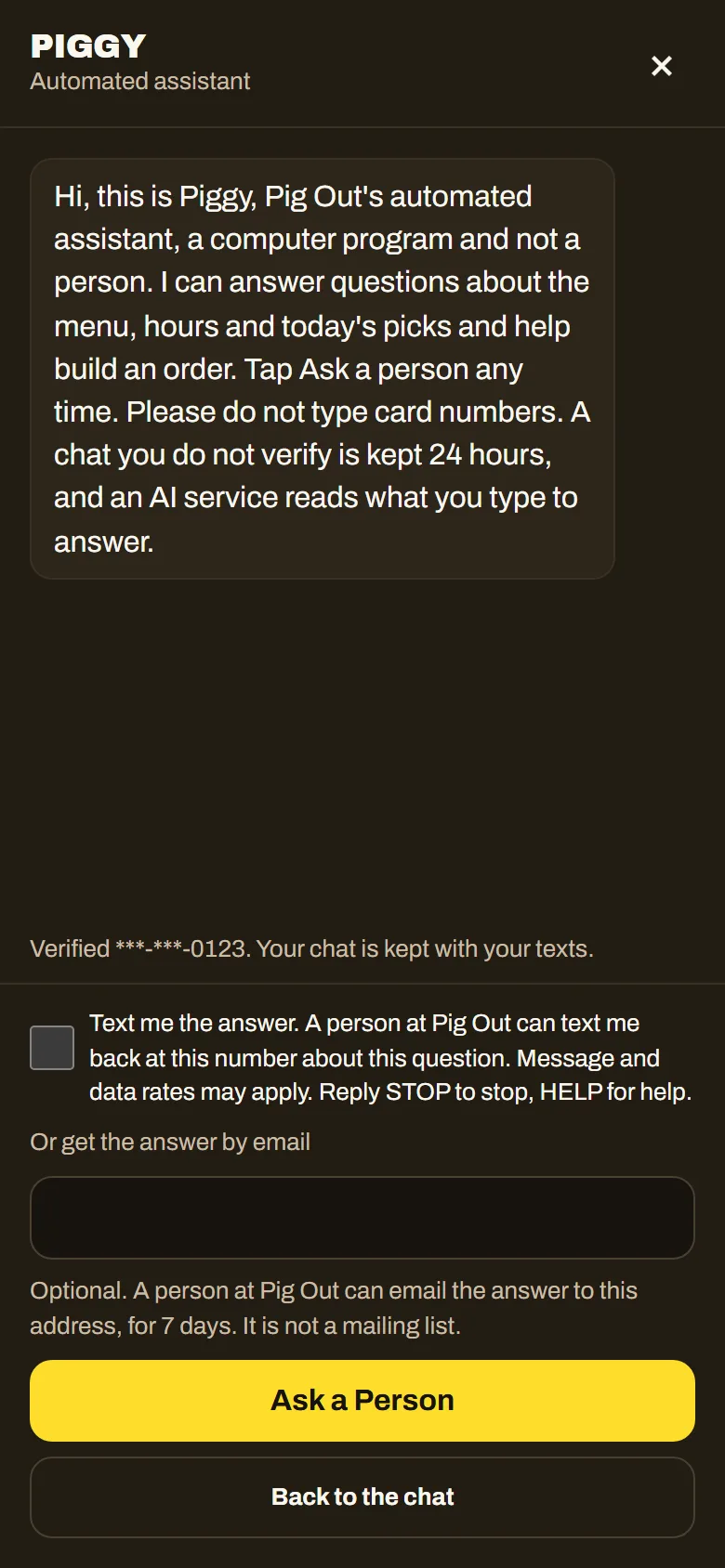 The website chat, Ask a Person step, box unticked. The number shown anywhere on these pictures is made up.
The same box in one more place
Our public giveaway entry pages carry the same unticked deals box with the same wording as the /join page, and it works the same way: only a request, and the number counts after the person replies YES. Entering a giveaway never sends a text by itself.
The rules that apply to every path
- Nothing is pre-ticked. A box only counts when the person ticks it.
- Consent is not a condition of purchase. You can order without agreeing to any text.
- Message frequency varies. Message and data rates may apply.
- Reply STOP to cancel at any time, HELP for help, START to sign up again.
- Marketing texts and confirmations go only between 8am and 9pm Pacific time.
- We keep a record of each agreement: the time and the exact words that were shown.
- We do not sell or share mobile numbers or text consent with third parties for their marketing.
Terms, privacy and support
Back to the menu